

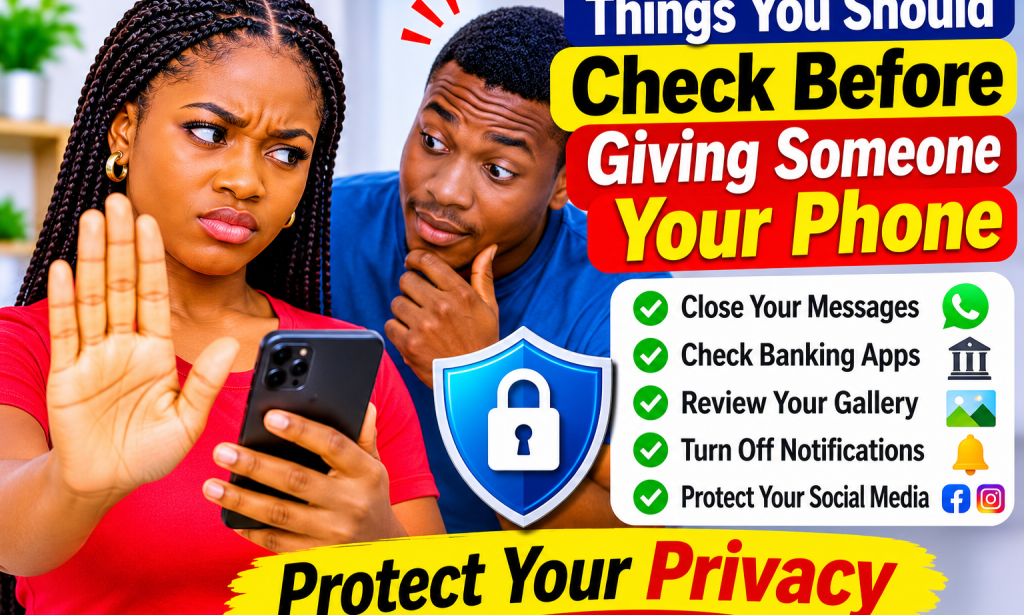
Things You Should Check Before Giving Someone Your Phone
Giving someone your phone may seem like a simple thing to do. It could be a friend, neighbour, family member, colleague or even someone you have just met. Sometimes, people ask to use your phone to make a call, check something online, send a message or perform another task.
However, your phone contains more than just pictures and applications. It may contain private conversations, personal photographs, bank details, passwords, emails and other important information.
Allowing someone to use your phone without taking precautions can expose you to privacy and security risks.
Here are 10 important things you should check before giving someone your phone.
1\. Close Your Private Messages
Before handing your phone to someone, close your WhatsApp, Messenger, SMS and other messaging applications.
Someone may accidentally or deliberately open your conversations and read messages you never intended to share. Keeping private conversations closed helps protect your personal information.
2\. Close Your Banking Applications
Your banking applications contain sensitive financial information. Before giving someone your phone, make sure your banking apps are closed.
Never share your banking PIN, passwords or one-time verification codes with anyone. Someone should not need these details simply to make a phone call.
3\. Check Your Gallery
Your phone gallery may contain personal photographs, videos, screenshots and documents.
Before allowing someone to use your phone, consider whether you have private files that you do not want others to see. You can lock sensitive folders using your phone's available privacy features.
4\. Turn Off Important Notifications
Notifications may display private messages, verification codes, emails and other sensitive information on your screen.
Consider hiding notification previews before giving your phone to someone. This can prevent private information from appearing while the person is using your device.
5\. Avoid Sharing Your Password
Never give someone your phone password simply because they want to make a call or check something online.
If someone needs to use your phone briefly, you can unlock it yourself and supervise what they are doing. You do not have to reveal your personal password.
6\. Check Your Internet and Data Usage
If someone wants to browse the internet using your phone, remember that your mobile data is being used.
Be careful about allowing someone to download unknown applications, visit suspicious websites or install files without your permission.
7\. Protect Your Social Media Accounts
Your Facebook, Instagram, TikTok and other social media accounts may already be logged in on your phone.
Someone using your device could open these accounts, read private messages or make changes without your knowledge. Close your social media applications before handing over your phone.
8\. Do Not Allow Unknown Applications to Be Installed
Be careful when someone asks to install an application on your phone.
Some applications may request unnecessary permissions to access your contacts, photographs, microphone, camera or location.
Only install applications you trust and understand. Never allow someone to install unknown software without checking what it does.
9\. Keep an Eye on Your Phone
Even when you trust someone, it is wise to pay attention while they are using your phone.
Avoid handing your device to someone and walking away, especially if you do not know the person well. This helps prevent unauthorised access to your information.
10\. Take Your Phone Back Immediately After Use
Once the person has finished using your phone, collect it and check that everything is normal.
Make sure no unfamiliar applications have been installed, no settings have been changed and no personal accounts have been accessed without your permission.
If you notice anything suspicious, change your passwords and review your account security.
Why You Should Be Careful About Giving People Your Phone
Your phone is a personal device that contains information about your daily activities, relationships, finances and private life.
Not everyone who asks to use your phone has bad intentions. However, being careful does not mean you distrust everybody. It simply means you understand the importance of protecting your personal information.
If someone only needs to make a phone call, you can dial the number for them instead of giving them unrestricted access to your device.
You can also use features such as app locking, screen pinning or guest mode where available to limit access.
Conclusion
Giving someone your phone is not necessarily wrong, but you should always consider your privacy and security before doing so.
Remember to protect your private messages, banking applications, photographs, passwords and social media accounts.
Your phone contains valuable personal information. Do not give people unlimited access to it simply because they ask to use it.
Always protect your privacy, even when helping others.









































You must be logged in to post a comment.