
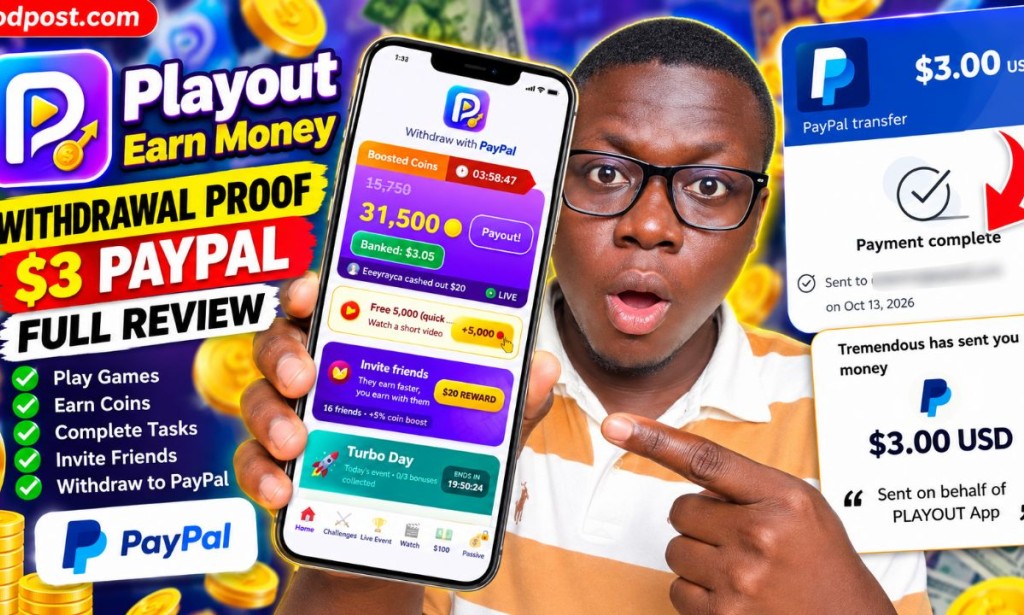
Playout Withdrawal Proof 2026: I Received $3 on PayPal Through Tremendous
By Amica Review | Updated October 13, 2026
Playout Review PayPal Withdrawal Payment Proof Earn Money Gaming App
When I first reviewed Playout, I wanted to understand whether this gaming app was genuinely capable of paying users or whether it was simply another application promising money for playing games.
I have now documented a $3 payout process, including the withdrawal screen inside the app, the email redemption instructions, the Tremendous payment page, and the associated payment confirmation screens.
In this updated investigation, I will explain how the withdrawal works, what you need before requesting your money, why you must check your email after requesting a payout, and what to do if the app asks you to complete camera verification.
I have also taken privacy seriously in preparing this article. Personal email addresses and transaction identifiers should be blurred or cropped from any payment screenshots published alongside it.
Join me on Playout with my code AMIC-GHR and start with 2x coin bonus for 48 hours! 🥳
join playout here
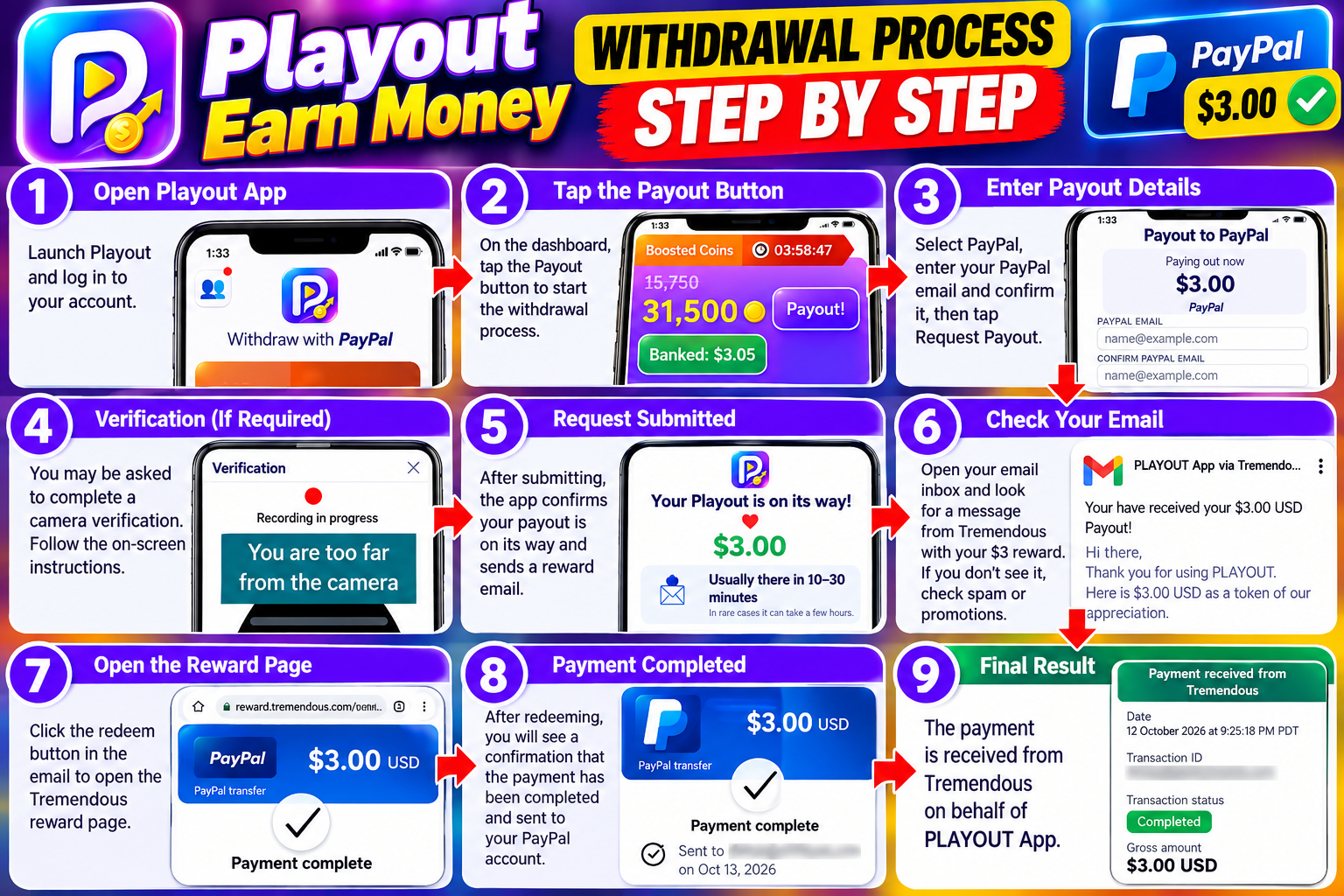
Table of Contents
- What Is Playout?
- My Latest $3 PayPal Payment Proof
- How Playout Payments Work
- Playout Withdrawal Requirements
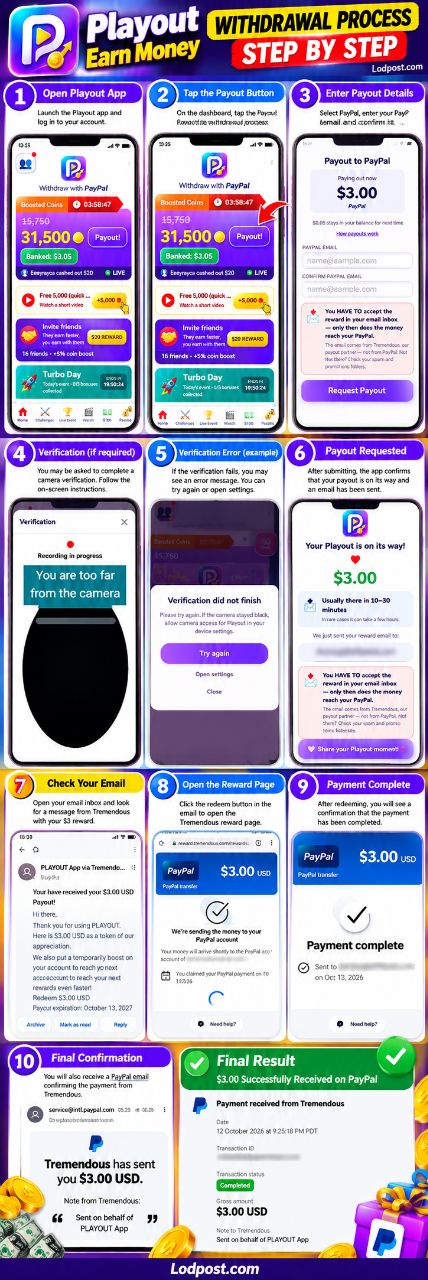
- How to Withdraw Money From Playout
- What Is Tremendous and Why Is It Involved?
- Why You Must Accept the Reward by Email
- Playout Camera Verification Problem
- Playout Minimum Withdrawal
- Playout Referral Program
- Can You Make Serious Money With Playout?
- Problems and Things to Watch Out For
- Is Playout Legit or a Scam?
- Payment Screenshot Privacy
- Final Verdict
What Is Playout?
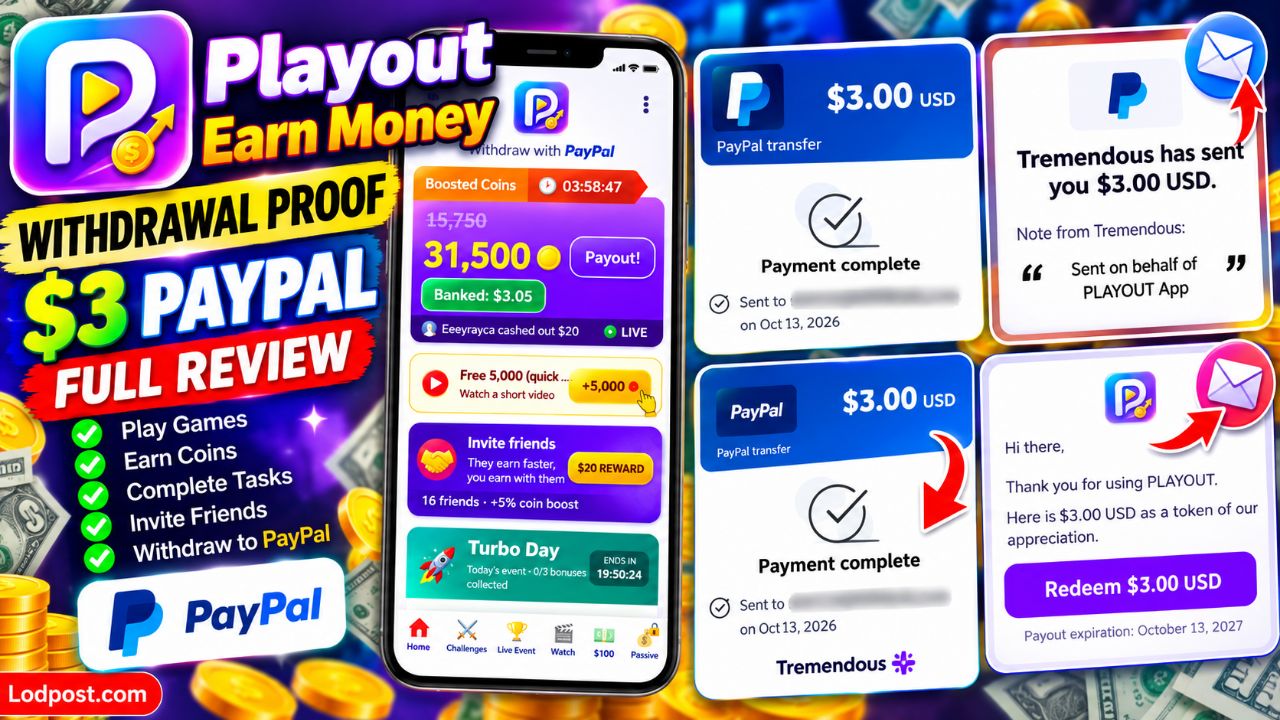
Playout is a mobile gaming rewards application that allows users to earn coins and rewards through gaming activities. The app displays games, challenges, bonus opportunities, videos, and a payout section where users can request money.
The app's dashboard includes a coin balance, a banked cash balance, a payout button, a boosted-coins timer, and promotional activities. There is also a referral feature that rewards users when invited friends reach specified milestones.
Playout promotes PayPal as a withdrawal option. However, the process is not necessarily as simple as clicking the payout button and immediately seeing money in your PayPal balance.
In my experience, the important part is understanding the additional redemption step. After requesting the reward, you may need to open an email from Tremendous and accept the reward before the transfer can reach your PayPal account.
My Latest $3 PayPal Payment Proof
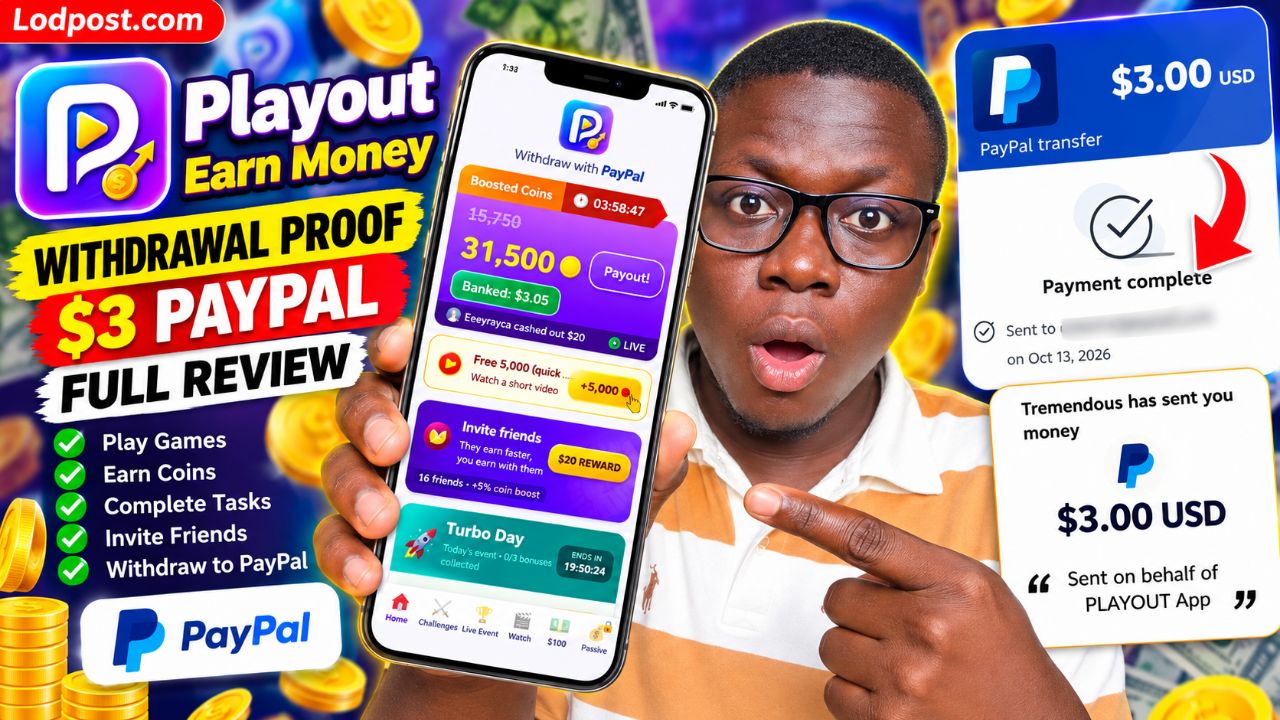
The main reason for this update is that I now have payment-related evidence from my own Playout withdrawal process. Rather than relying only on testimonials from other players, I documented the steps and the confirmation screens associated with a $3 reward.
Payment details visible in my records
| Platform | Playout |
|---|---|
| Payment amount | $3.00 USD |
| Payment method | PayPal transfer |
| Payout partner | Tremendous |
| Payment date | October 13, 2026 |
| Payment evidence | Reward redemption screens and payment confirmation records |
| Privacy | Personal email addresses and transaction identifiers are excluded from this article. |
The records show a $3 reward, a Tremendous payment page displaying a completed payment status, and transfer-related messages associated with the PayPal redemption process.
One important detail is that the process involves multiple stages. A reward being issued, a redemption being accepted, and a transfer being marked complete are related but distinct events. I therefore recommend checking the final status in your own PayPal account rather than relying only on the initial reward notification.
For this article, I have kept personal account details private. If I publish the original payment images on Lodpost.com, I will blur the email addresses and transaction ID before uploading them.
How Playout Payments Work
From the screens I documented, the payout process works through Playout and its reward delivery partner, Tremendous.
- Earn rewards inside Playout: Play eligible games and complete available activities to accumulate coins and cash rewards.
- Open the payout section: The dashboard includes a payout button and displays PayPal as the withdrawal method.
- Check the amount: The payout screen displays the amount being requested. In my documented withdrawal, the amount was $3.00.
- Enter your PayPal email: The form asks you to enter your PayPal email address and confirm it in a second field.
- Request the payout: Submit the request using the in-app payout button.
- Check your email inbox: Playout displays a message explaining that the reward must be accepted through an email from Tremendous.
- Redeem the reward: Open the reward email, follow its redemption instructions, and select the available PayPal transfer option.
- Check the payment status: Follow the status page and check the PayPal account you used for the transfer.
Playout Withdrawal Requirements
Before requesting a Playout withdrawal, I recommend checking the following requirements. These points are based on the screens displayed during my payout process.
| Requirement | What You Should Do |
|---|---|
| Eligible reward balance | Make sure your available balance meets the payout amount displayed in your account. |
| PayPal account | Have access to the PayPal account you intend to use. |
| Correct email address | Enter your PayPal email accurately in both fields and check for spelling mistakes. |
| Email access | Be able to open the inbox where Playout sends its reward redemption email. |
| Reward acceptance | Follow the instructions in the Tremendous email to redeem the reward. |
| Camera permission | If Playout requests verification, check the permission prompt and follow the instructions presented by the app. |
| Internet connection | Use a stable connection when requesting the payout and completing redemption. |
I did not find enough evidence in these screens to establish a universal account age requirement, a mandatory government ID requirement, or a single processing time that applies to every user. Check the current in-app terms for any additional eligibility rules that apply to your account.
How to Withdraw Money From Playout: Step-by-Step Guide
Step 1: Open your Playout dashboard
Open Playout and check the cash balance displayed on the main dashboard. The interface separates the coin balance from the cash amount that has been banked.
Do not assume that a large coin balance automatically means the same amount of withdrawable cash. Check the amount displayed by the payout feature.
Step 2: Tap the Payout button
On the dashboard, tap the payout button to open the withdrawal form. My screen displayed a PayPal payout option and a requested amount of $3.00.
Step 3: Enter your PayPal email
Enter the email address associated with your PayPal account. Playout provides two fields: one for the PayPal email and another to confirm it.
Make sure the two entries match. An incorrect address could delay your reward or send it to an unintended destination.
Step 4: Review the balance remaining
My payout screen displayed a message saying that $0.05 would remain in the balance for the next time. This was the balance shown during my particular withdrawal; it should not be treated as a universal rule for every account or payout.
Step 5: Submit your payout request
Tap the request payout button. The app then explains that your reward email usually arrives within 10–30 minutes, although it also warns that it can take a few hours in some cases.
This is the estimated email delivery time displayed by Playout, not a guarantee that the funds will always reach PayPal within that same period.
Step 6: Open the Tremendous reward email
After submitting the request, check your inbox for the reward email. The instructions identify Tremendous as the payout partner and explain that you must accept the reward before the money reaches PayPal.
If the email does not appear, check your spam and promotions folders. Also confirm that you used the correct email address when requesting the payout.
Step 7: Accept and redeem the reward
Open the email and use the redemption option provided. Follow the instructions on the official reward page and select PayPal if it is offered for your reward.
Make sure you understand the page before submitting any details. Do not share your PayPal password, email password, or security codes with anyone claiming to help you redeem the reward.
Step 8: Confirm the transfer
After completing the redemption, check the status page and your PayPal account. Look for a completed payment or a corresponding transaction in your PayPal activity.
My captured records show a $3 reward and payment confirmation information. I recommend keeping your own confirmation email until the funds are visible in your account.
What Is Tremendous and Why Is It Involved?
One detail that may confuse new Playout users is that the reward email does not necessarily come directly from PayPal.
The Playout withdrawal screen identifies Tremendous as its payout partner. The reward message instructs users to accept the reward through the email before the transfer reaches PayPal.
This means you may encounter a reward page, a redemption confirmation, and a separate PayPal-related transfer notification during the same payout process.
From the evidence I captured, Tremendous is part of the payment delivery process. Its involvement is not, by itself, evidence of a problem. However, you should always verify that the redemption page and emails are genuine before providing information.
Why You Must Accept the Reward by Email
This is one of the most important findings from my updated Playout review.
During the withdrawal process, Playout clearly warned me that the money would not reach PayPal without accepting the reward in the email inbox.
In other words, requesting the payout and redeeming the reward are separate steps. If you request your money and then close the app without checking your email, you may leave the process unfinished.
Here is what I recommend:
- Keep access to the email address you entered in Playout.
- Check your inbox after submitting the payout request.
- Check spam and promotions folders if the message is missing.
- Read the reward instructions carefully.
- Complete the redemption using the official page.
- Keep the confirmation until you have checked your PayPal activity.
Playout Camera Verification Problem: What Happened to Me?
Another issue I encountered during the withdrawal process was a camera verification screen.
The app displayed a verification interface and instructed me to position myself correctly in front of the camera. One screen showed the message that I was too far from the camera. Another displayed a notice saying verification had not finished and suggested checking camera access in the device settings.
This indicates that a verification step can appear during the app experience. However, the screenshots do not establish that every Playout user must complete this verification before every withdrawal.
What to do if camera verification fails
- Check whether camera permission is enabled for Playout in your Android settings.
- Clean the camera lens and make sure the lighting is sufficient.
- Position your face at the distance requested by the verification screen.
- Keep your face within the area indicated by the app.
- Close other applications that may be using the camera.
- Retry the verification if the app provides that option.
- If it continues to fail, contact the app's official support channel.
If the camera remains black or the verification screen repeatedly fails, do not assume your account has been permanently blocked. It may be a permission, device compatibility, lighting, or app problem. Ask support to clarify whether verification is required for your account and what alternatives, if any, are available.
Also, be careful about granting camera access. Only grant permissions through your device's normal Android permission settings when you understand why the app needs them.
Playout Minimum Withdrawal: How Much Can You Cash Out?
A common question is whether Playout has a $2 or $3 minimum withdrawal. Some user reviews have mentioned low first-payout amounts, but user reports alone do not establish a universal minimum for every country or account.
In my documented withdrawal, the app presented a $3 PayPal payout. That confirms the amount shown in my own payout process, but it does not prove that $3 is the only available withdrawal amount or the official minimum for all users.
| Withdrawal detail | What I could establish |
|---|---|
| Amount in my documented payout | $3.00 USD |
| Payment option shown | PayPal |
| Reward delivery partner | Tremendous |
| Reward email estimate | Usually 10–30 minutes; sometimes a few hours, according to the app |
| Final transfer time | Can depend on the redemption and payment process; no universal guarantee was established |
| Withdrawal fee | Not established by the supplied evidence |
| Universal minimum | Not conclusively established; check the current payout screen |
My advice is to trust the current payout amount and conditions displayed inside your own account rather than relying on old videos, social media posts, or claims from another user in a different region.
Playout Referral Program: Earn Through Invited Friends
While investigating the withdrawal process, I also checked the referral feature displayed in the app.
Playout advertises a reward of up to $20 per friend through seven milestones. It also explains that a referred friend can begin with twice the earnings for 48 hours.
The referral dashboard tracks a friend's progress and shows different rewards associated with activities and earning milestones. The displayed conditions include joining through your code, watching a first video, reaching certain earnings amounts, and maintaining activity streaks.
The important point is that the advertised $20 is tied to completing milestones. It should not be interpreted as an automatic $20 payment simply for sending somebody a referral link.
The referral feature displayed in my account also showed an invitation code. If you want to use my referral invitation, you can enter the code below when the app offers the appropriate referral field:
Amica Review referral code:
AMIC-GHR
Referral availability and reward conditions can change. Confirm the current rules inside Playout before joining.
I would not recommend inviting friends solely because of the advertised reward. Explain how the app works, including its ads, milestone requirements, email redemption process, and possible verification issues.
Can You Make Serious Money With Playout?
Playout may be useful for people who already enjoy mobile games and want to collect small rewards while playing. However, I would not treat it as a reliable replacement for a job, business, or established source of online income.
The amount you can earn depends on the activities available to your account, how rewards are calculated, which milestones you complete, and whether the app credits your progress correctly.
Another important factor is time. An app may display a reward opportunity worth several dollars, but you might need to complete multiple game levels, watch advertisements, or reach specific milestones before qualifying.
For that reason, I recommend tracking how much time you spend earning each reward. If a task requires hours of gameplay for a very small payout, it may not be worth your time.
My practical advice
- Start with the free activities.
- Track the time spent on each game or challenge.
- Check that completed tasks are credited correctly.
- Do not count promotional balances as money already received.
- Complete the payout redemption process carefully.
- Avoid spending money simply to chase an advertised reward.
Playout Problems and Things to Watch Out For
Although my payment records provide encouraging evidence about the payout process, a balanced review must also discuss the possible difficulties.
1. Email redemption is an extra step
Users need to pay attention to the reward email and complete the redemption process. Someone who expects an instant transfer immediately after pressing the payout button may become confused.
2. Camera verification may fail
My screenshots show a verification attempt that did not finish. Camera permissions, distance, lighting, or technical problems may interfere with this process.
3. The advertised processing time is not a guarantee
Playout says reward emails usually arrive within 10–30 minutes, with longer delays possible. That is an estimate provided by the app, not a promise that every user will receive the money within 30 minutes.
4. Rewards depend on conditions
Referral rewards are tied to milestones, while gaming rewards depend on the available activities and their requirements. Do not assume that every promotional amount can be collected immediately.
5. Payment confirmation must be interpreted carefully
A reward issued by Playout, a completed status on a redemption page, and money visible in PayPal are different checkpoints. Keep your confirmation records and verify the final destination account.
6. Privacy and verification deserve attention
The app may request access to device features during verification. Review the permission request, use the official app, and avoid sending personal documents or security details to unofficial contacts.
Is Playout Legit or a Scam in 2026?
Based on the payment records I documented, I have evidence that a $3 reward was processed through the Playout and Tremendous payout flow, with PayPal identified as the intended payment method. The records include reward and payment confirmation screens.
This is stronger evidence than a promotional screenshot showing only an in-app balance. Nevertheless, I would not use one transaction to guarantee that every Playout user will receive every reward without delay or difficulty.
My experience also included a camera verification problem, which is worth mentioning to anyone planning to use the app.
My assessment as Amica Review
Positive signs:
- A documented $3 payout process.
- PayPal is displayed as a withdrawal option.
- The app explains its use of Tremendous for reward delivery.
- The withdrawal interface provides instructions for accepting the reward by email.
Points requiring caution:
- Camera verification did not finish during one of my attempts.
- The final transfer may require more than one step.
- A single successful payout cannot guarantee future payments for everyone.
- Earning potential and the time required to complete tasks should be considered carefully.
My verdict: The evidence from my documented $3 payout is encouraging, and it supports the conclusion that the Playout reward system can process a payment through its stated payout flow. I would describe the app as a potentially usable rewards platform, but I would still advise users to start cautiously and verify every withdrawal.
How I Protect My Payment Screenshot Privacy
Payment evidence can help readers understand how an earning platform works, but publishing a receipt without protecting personal information can create unnecessary privacy risks.
Final Verdict: My Updated Playout Withdrawal Review
After documenting the $3 withdrawal process, I can provide a more informed update than I could from looking at the app's dashboard alone.
Playout displays PayPal as a withdrawal option and uses Tremendous to deliver the reward. The most important requirement I discovered is that requesting a payout is not necessarily the last step: you must check your email and accept the reward before the transfer can reach PayPal.
I also encountered a camera verification issue. Anyone experiencing the same problem should check camera permissions, follow the on-screen positioning instructions, and contact official support if the verification continues to fail.
My documented $3 payment is a positive sign, but it does not mean Playout will provide substantial earnings or that every withdrawal will be trouble-free. I recommend using the free features first, checking your actual earnings against the time spent, and avoiding unnecessary spending.
If you are already using Playout, pay close attention to the email redemption requirement. It may be the difference between a reward request that remains unfinished and a successfully completed transfer.
This is my updated investigation as Amica Review. I will continue to judge earning platforms by the available evidence, their withdrawal conditions, and the actual experience documented—not by promotional promises alone.
Disclaimer: This article is for informational and educational purposes only. Earnings, reward availability, verification requirements, and payment processing can change. The documented experience described here does not guarantee that other users will receive the same result.
Published by: Amica Review on Lodpost.com


You must be logged in to post a comment.