
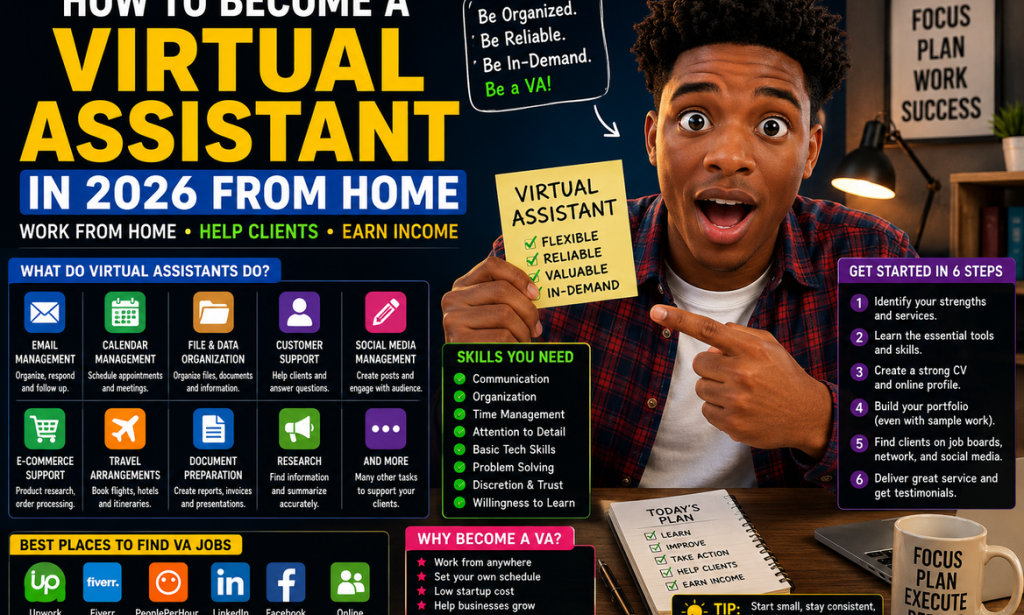
How to Become a Virtual Assistant in 2026 From Home
A Complete Beginner's Guide
Working from home has become an attractive option for people who want more flexibility, and becoming a virtual assistant is one way to enter the online services world without needing to create a complicated business.
A virtual assistant, often called a VA, provides administrative, creative, technical, or customer-support services remotely.
You could help a business manage emails, organize appointments, prepare documents, research information, manage social media, or handle other routine tasks.
You don't need to know everything before starting.
The goal is to identify what you can already do, learn the skills you are missing, and offer a clear service to people who need help.
What Does a Virtual Assistant Do?
Virtual assistants can perform many different tasks.
Depending on their skills and clients, they may handle:
-
Email management
-
Calendar management
-
Data entry
-
File organization
-
Customer support
-
Online research
-
Document preparation
-
Social-media management
-
Appointment scheduling
-
Travel arrangements
-
E-commerce support
-
Basic bookkeeping
-
Administrative tasks
You don't need to offer every service.
Starting with a few services you can perform well is usually easier.
Step 1: Understand Your Existing Skills
Before learning something completely new, think about what you already know.
You might already be good at:
-
Organizing information
-
Communicating with people
-
Using computers
-
Writing
-
Scheduling
-
Researching
-
Creating documents
-
Managing social media
-
Handling customer questions
These skills can become the foundation of a VA service.
Step 2: Choose Your VA Services
Don't introduce yourself as someone who can do "everything."
Choose a small group of related services.
For example:
Administrative VA
-
Email management
-
Calendar scheduling
-
Data entry
-
Document organization
Social Media VA
-
Content scheduling
-
Caption writing
-
Community management
-
Basic content organization
E-commerce VA
-
Product research
-
Product listings
-
Customer messages
-
Order support
A clear service makes it easier for clients to understand your value.
Step 3: Choose Your Target Client
Think about who you want to help.
Potential clients include:
-
Small businesses
-
Online stores
-
Coaches
-
Consultants
-
Bloggers
-
Real estate professionals
-
Creators
-
Agencies
-
Entrepreneurs
Choosing a type of client can help you create a more relevant offer.
Step 4: Learn the Essential Tools
You don't need dozens of applications.
Start by becoming comfortable with common workplace tools for:
-
Email
-
Calendars
-
Documents
-
Spreadsheets
-
Video meetings
-
Cloud storage
-
Project management
The exact tools your clients use will vary.
The important thing is learning how to adapt quickly.
Step 5: Improve Your Communication
Communication is one of the most important VA skills.
Clients need to know:
-
What you've completed
-
What you're working on
-
What information you need
-
Whether you're facing a problem
-
When something will be finished
Respond professionally and don't disappear when something goes wrong.
Step 6: Learn Time Management
A VA may work with several clients or tasks at once.
Learn to organize:
-
Deadlines
-
Appointments
-
Priorities
-
Recurring tasks
-
Client requests
Use a calendar, task list, or project-management system to stay organized.
Step 7: Create a Simple Workspace
You don't need an expensive home office.
A practical workspace can include:
-
A reliable computer
-
Stable internet
-
Headphones
-
A comfortable chair
-
A quiet environment
-
Backup internet when possible
Your workspace should allow you to communicate with clients and complete tasks reliably.
Step 8: Create Sample Work
You don't need previous clients to demonstrate your abilities.
Create sample projects.
For example:
-
A sample weekly calendar
-
An organized spreadsheet
-
A sample customer-service response
-
A sample social-media content calendar
-
A sample business document
Clearly label them as samples.
Step 9: Build a Simple Portfolio
Your portfolio should show potential clients what you can do.
Include:
-
Short introduction
-
Services
-
Skills
-
Sample work
-
Contact information
Keep it clean and easy to understand.
Step 10: Create a Professional Profile
Your online profile should quickly communicate:
Who you help + what you do + what result you provide.
For example:
I help small businesses stay organized by managing email, calendars, documents, and routine administrative tasks remotely.
That's much clearer than simply saying:
Virtual Assistant for hire.
Step 11: Decide How You'll Charge
Virtual assistants may charge:
-
Hourly
-
Per project
-
Per task
-
Weekly
-
Monthly retainer
The best approach depends on your services and the client's needs.
Step 12: Calculate Your Costs
Before setting your price, consider your expenses.
You may have costs for:
-
Internet
-
Software
-
Equipment
-
Payment processing
-
Workspace
-
Professional services
Your pricing needs to make sense after expenses.
Step 13: Start With a Simple Offer
You could create a starter package such as:
Basic Administrative Support
-
Email organization
-
Calendar management
-
Document organization
-
Weekly task updates
A package makes your service easier to understand.
Step 14: Find Your First Clients
Potential places to look include:
-
Freelance marketplaces
-
Professional networks
-
Business communities
-
Social media
-
Local businesses
-
Personal referrals
-
Direct outreach
Don't depend on one source.
Step 15: Contact Businesses Directly
Research businesses that could genuinely benefit from assistance.
Your message should be short and personalized.
Explain:
-
What you noticed
-
What service you provide
-
How you could help
Avoid sending generic spam messages.
Step 16: Use Freelance Platforms Carefully
Freelance platforms can provide access to clients, but competition can be strong.
Create a profile that clearly shows:
-
Your specialty
-
Your skills
-
Your services
-
Your samples
-
Your availability
Apply only for projects that match your abilities.
Step 17: Network Online
Join communities where your potential clients spend time.
Participate helpfully.
Answer questions.
Share useful information.
Build genuine relationships rather than constantly promoting yourself.
Step 18: Provide Excellent Customer Service
A VA isn't simply someone completing tasks.
You're also part of the client's workflow.
Be:
-
Reliable
-
Organized
-
Professional
-
Respectful
-
Responsive
Good service can lead to repeat work.
Step 19: Protect Client Information
Virtual assistants may handle sensitive business information.
Take confidentiality seriously.
Use secure passwords and follow the client's security procedures.
Don't share private client information publicly.
Step 20: Ask Questions Before Starting
Before accepting a project, make sure you understand:
-
What needs to be done
-
When it is due
-
What format is required
-
Which tools you'll use
-
Who approves the work
-
How revisions are handled
Clear expectations prevent many problems.
Step 21: Create a Task System
For each client, maintain a simple list:
To Do
In Progress
Completed
This makes it easier to see what needs attention.
Step 22: Keep Client Files Organized
Use clear folder names and file structures.
For example:
Client Name
→ Documents
→ Social Media
→ Reports
→ Completed
→ Resources
Good organization saves time.
Step 23: Learn Basic Spreadsheet Skills
Spreadsheets can be useful for:
-
Lists
-
Budgets
-
Customer records
-
Content calendars
-
Inventory
-
Project tracking
You don't need advanced skills at first.
Learn the fundamentals and improve as needed.
Step 24: Learn Basic Customer Support
If customer service interests you, practice:
-
Responding politely
-
Understanding complaints
-
Finding solutions
-
Escalating difficult issues
-
Keeping accurate records
Professional communication can make you valuable to busy businesses.
Step 25: Consider Specializing
Once you gain experience, specialization can help you stand out.
You might become:
-
E-commerce VA
-
Real estate VA
-
Social-media VA
-
Executive VA
-
Customer-support VA
-
Bookkeeping VA
-
Podcast VA
Choose a specialization based on your interests and market demand.
Step 26: Build Experience
Your first projects may not be your highest-paying work.
Use early opportunities to develop:
-
Skills
-
Testimonials
-
Portfolio examples
-
Client relationships
-
Confidence
Then gradually move toward better opportunities.
Step 27: Ask for Testimonials
When you've successfully completed a project, ask satisfied clients for feedback.
A strong testimonial can help future clients feel more confident about hiring you.
Step 28: Encourage Referrals
If a client is happy with your work, they may know someone else who needs assistance.
Let satisfied clients know you're available for additional work or referrals.
Step 29: Create Recurring Services
Instead of only offering one-time projects, consider services that businesses need regularly.
For example:
Monthly administrative support
or:
Weekly social-media management
Recurring work can make income more predictable.
Step 30: Improve Your Skills Continuously
The online workplace changes.
Continue learning:
-
Better communication
-
Organization
-
Customer service
-
Spreadsheet skills
-
Project management
-
Industry-specific knowledge
The more useful you become, the more opportunities you can pursue.
Step 31: Don't Pretend to Know Something You Don't
If you don't know how to perform a task, be honest.
You can say:
I haven't used that system before, but I'm willing to learn it.
Honesty is better than pretending and making an expensive mistake.
Step 32: Keep Track of Your Work
Maintain records of:
-
Clients
-
Tasks
-
Hours
-
Payments
-
Expenses
-
Deadlines
This makes your business easier to manage.
Step 33: Create a Professional Invoice Process
Make sure clients understand:
-
What they're being charged for
-
The amount due
-
The payment deadline
-
Accepted payment methods
Keep copies of invoices and payment records.
Step 34: Set Boundaries
Working from home doesn't mean you have to be available 24 hours a day.
Clearly communicate:
-
Working hours
-
Response times
-
Availability
-
Emergency procedures
Boundaries help prevent burnout.
Step 35: Avoid Overloading Yourself
When you start getting clients, don't accept more work than you can handle.
Missing deadlines can damage your reputation.
It's better to manage a smaller workload well than accept everything and struggle to deliver.
Step 36: Increase Your Rates Gradually
As your experience and demand increase, review your pricing.
Consider increasing your rates when:
-
Your skills improve
-
Your portfolio becomes stronger
-
You produce better results
-
Your schedule becomes consistently busy
-
You're offering specialized services
Step 37: Turn Your VA Skills Into Other Services
Your experience can eventually lead to additional opportunities.
For example:
Administrative VA
→ Operations support
Social-media VA
→ Social-media management
E-commerce VA
→ E-commerce management
The skills you develop can open new career paths.
Step 38: Build a Reputation for Reliability
Clients value people they can trust.
If you consistently:
-
Meet deadlines
-
Communicate clearly
-
Protect information
-
Follow instructions
-
Solve problems
you can become an important part of a client's business.
Step 39: Watch Out for Scams
Be careful with opportunities that:
-
Promise huge guaranteed earnings
-
Require suspicious upfront payments
-
Ask you to cash checks and send money back
-
Request unnecessary personal information
-
Have unclear job descriptions
-
Pressure you to act immediately
Research unfamiliar clients before accepting work.
Step 40: Don't Buy Expensive Equipment Too Early
You don't need a high-end office to start.
Begin with reliable equipment.
Upgrade when your work genuinely requires it and your income can support the expense.
Step 41: Create a 30-Day Starting Plan
Week 1
Identify your skills.
Choose your services.
Choose your target clients.
Week 2
Learn any essential skills you're missing.
Create sample work.
Build your portfolio.
Week 3
Create your professional profiles.
Find potential clients.
Begin outreach.
Week 4
Apply for suitable opportunities.
Talk to potential clients.
Complete your first projects.
Ask for feedback.
Step 42: Create a 90-Day Growth Plan
Month 1
Focus on learning and finding your first client.
Month 2
Improve your service and collect testimonials.
Month 3
Develop recurring services and look for better opportunities.
Don't worry if your results don't happen immediately.
Building a reputation takes time.
Final Thoughts
Becoming a virtual assistant in 2026 can be a practical way to build an online career from home.
You don't need to master every business skill before you begin.
Start with what you know.
Choose a few services.
Learn the tools you need.
Create sample work.
Build a simple portfolio.
Find potential clients.
Deliver excellent service.
Then gradually specialize and increase your value.
The biggest advantage isn't simply being able to work from home.
It's developing skills that businesses genuinely need.
Start small, stay organized, communicate professionally, and keep improving.
Over time, a simple VA service can become a flexible and sustainable online career.

You must be logged in to post a comment.